Custom properties
Segmenting by something only your application knows.
A custom property is a key and a value attached to an event, so you can break a report down by something only your application knows - a plan name, a category, a variant.
They’re in every plan, with no cap on how many you register and no “custom dimensions” allowance to buy. Send them with the tracker’s own API:
feasible('Signup', {
  props: { plan: 'yearly', referred_by: 'partner' }
})
A pageview takes them under p rather than props, which is a wart of the wire format we match for
compatibility:
feasible('pageview', { p: { variant: 'b' } })
Putting the same properties on everything
Naming a property on every call gets old fast, and it can’t reach the pageview the script sends by itself. Declare them once instead.
Set window.__fsp above the snippet and they ride on everything, starting with that first pageview:
<script>window.__fsp = { plan: 'yearly', logged_in: 'true' };</script>
Or set them after the script has loaded, which is what you want when the values arrive with a session:
feasible('init', { props: { plan: 'yearly', logged_in: 'true' } })
The difference matters. __fsp is read before the first pageview, so that pageview carries them -
and it’s the entry pageview that decides how a whole visit gets attributed. init can’t reach a
pageview that’s already gone.
They ride on every event after that: your own feasible() calls, outbound clicks, downloads, form
submissions and tagged elements. Engagement isn’t one of these - time on page and scroll depth are
measurements we take, not things you did, and they carry no properties.
A property named on a single call beats the global of the same name. The specific statement wins.
The same caps apply here, applied in the browser before anything is sent: the first 30 names, and
values cut at 2,000 characters. Your object is copied when you declare it, so editing it afterwards
doesn’t rewrite what earlier events said. Calling init again replaces the whole set rather than
merging into it.
Nothing is written to the browser’s storage. A plan cached on disk would outlive the login it describes.
The limits, and what happens at each one
- 30 properties per event. The rest are dropped and counted as
props_over_limit. Which thirty survive isn’t luck: names are sorted and the first thirty kept, so the same event always loses the same properties. - 300 bytes per name, 2,000 per value. Longer ones are cut to the limit and counted as
prop_name_too_longorprop_value_too_long. The property is still stored - truncated, not rejected. - Strings, numbers and booleans only. An object, an array or a
nullis dropped and counted asprop_value_unsupported. It’s as lost as a thirty-first property would be. - A property name may not contain a double quote or a backslash.
Nothing is lost quietly. Every one of those counters is kept per site and shown on the ingestion
health panel, and the whole event’s tally comes back on an
X-Debug-Request.
Numbers are normalized, so 1 and 1.0 are one value rather than two rows that look identical and
never add up.
A property of one hit, or of a whole visit
Every property has a scope, and it’s worth thinking about for ten seconds when you add one.
- Event scope - a fact about one hit. The product in an Add to cart. The file in a download.
- Session scope - a fact about the whole visit. The A/B variant. The plan tier the visitor is signed in as.
The scope decides a denominator, which is the only reason it exists.
A conversion rate filtered by an event-scoped property divides by everybody, because the property only exists on the conversion itself. Filtered by a session-scoped one it has to divide by the visitors who had that value - the visitors in that variant - or the variant with fewer visitors always looks worse than it is, for arithmetic reasons that have nothing to do with your test.
A property nobody has scoped is treated as event-scoped, which is the conservative answer. The scope can be changed later: getting it wrong the first time is normal, and correcting it is one setting rather than a support ticket.
Register a property under Settings → Sites → your site → Conversions and choose its scope there. Properties already received from the tracker can be allowed individually or all at once. A property that hasn’t been registered is still stored, but it isn’t exposed as a dashboard dimension until you allow it.
Don’t put personal data in a property
Email addresses, names, user ids, session tokens.
A property is stored and returned as your site sent it, and shown on a dashboard, and we can’t un-store it for you afterwards. If you need to segment by user, send a value that identifies a group rather than a person.
The same goes for query strings. Every parameter except the seven acquisition ones - ref, source,
utm_source, utm_medium, utm_campaign, utm_content and utm_term - is stripped from the
stored path before anything is written, precisely because sites do put tokens and addresses in them.
Reading them back
Every property is available as a dimension in the query API, as event:props:<name>, and can be
grouped by, filtered on and combined with any other filter:
{
  "site_id": "example.com",
  "metrics": ["visitors", "events"],
  "date_range": "28d",
  "dimensions": ["event:props:plan"],
  "filters": [["is", "event:name", ["Signup"]]]
}
There’s no separate “custom dimensions” allowance to configure and no extra charge for using them.
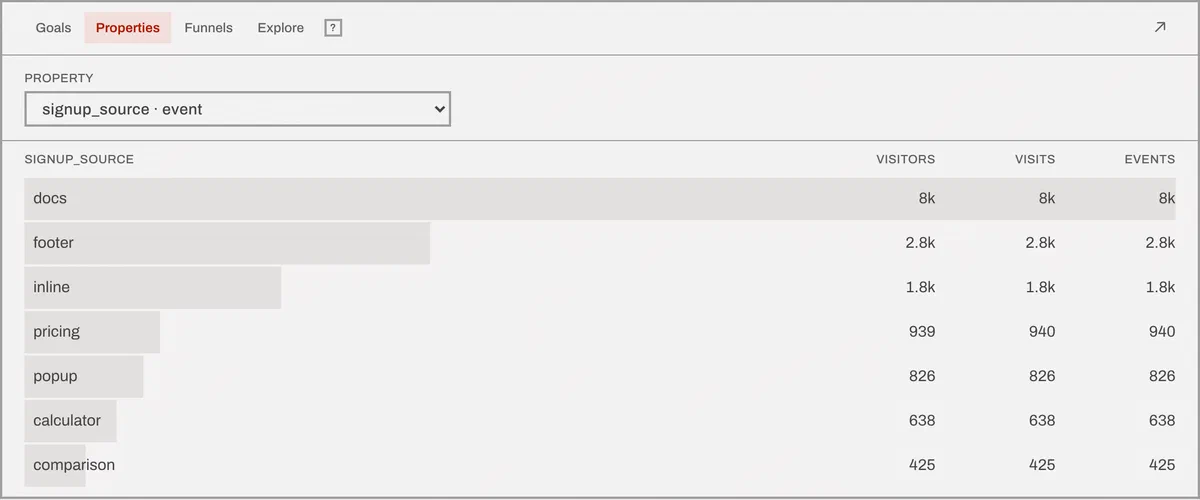
Registered properties appear in the dashboard filter menu and in the Properties report beside Goals, Funnels and Explore. Selecting a value adds the same URL filter the query API uses:
/dashboard/example.com?period=28d&f=is,event:props:plan,yearly
A property isn’t free, but it isn’t billed either
The custom event carrying it counts toward your monthly volume. The properties themselves add nothing - one event with thirty properties is one billable event. See what isn’t counted toward your bill.
A goal can also be narrowed by up to three property constraints, which is how you turn “somebody bought” into “somebody on the yearly plan bought”.
Aggregating a numeric property
A property holding a number can be summed, averaged and reduced to a percentile, not just counted. The metric names are the aggregate wrapped around the property:
"metrics": ["sum(event:props:price)", "avg(event:props:price)", "p95(event:props:load_ms)"]
The aggregates are sum, avg, min, max, p50, p75, p90, p95 and p99. They combine
with every filter and every breakdown, so the 95th percentile of a load time per page is one query.
The percentiles are nearest-rank: the answer is always a value somebody sent, never a number interpolated between two real ones. For a load time that matters - an interpolated 95th percentile is a duration no visitor experienced.
When the values aren’t all numbers
Properties are stored as text, because a property is a filter value on a dashboard and a column that’s sometimes a number and sometimes a word is a column nothing can index.
So a property holding 19.99 on most events and free on a few is a real possibility, and the
thing to do with the word is leave it out. Counting it as zero would drag an average down with
nothing on the screen to say why.
That’s what happens, and the response says so. Any aggregate that had to skip a value comes back with
a not_numeric warning naming both counts: “measured over 412 of the 431 values of price - the other
19 are text and were left out rather than counted as zero”. A property that turned out to hold no
numbers at all says that too, rather than answering zero and letting you read it as a real zero.
Scope decides what a sum adds up
A property registered as event-scoped describes one hit, so a sum adds up every event that carried it. A property registered as session-scoped has one value per visit by declaration, so it’s counted once per visit however many pages that visit touched.
Get that the wrong way round and an order value repeated on six pageviews is summed as six orders - a number six times too large that looks perfectly reasonable. That’s the whole reason a property carries a declared scope.