Goals and funnels
How they’re counted, and why goals don’t backfill.
Goals, properties and funnels are managed in site settings and reported together at the bottom of the dashboard. The Explore tab turns the same events into an open-ended journey report. The API uses the same definitions as the screens.
All of it is in every plan. There’s no conversions add-on.
Goals
A goal is a page somebody reached, a custom event they sent, or a scroll depth reached on a page.
A pageview goal matches a path, optionally with wildcards: /checkout/thank-you, or /blog/**.
* stays inside one path segment and ** crosses them, so /blog/* is the posts directly under
/blog and /blog/** is everything beneath it. The pattern is anchored at both ends, so /pricing
doesn’t match /enterprise-pricing-guide. It costs nothing toward your monthly volume, because the
pageview it matches was already counted.
A custom event goal matches an event you send by name:
feasible('Signup')
feasible('Purchase', { revenue: { amount: 49.00, currency: 'USD' } })
Custom events do count toward your monthly volume, because each one is an event we received and stored.
A scroll goal matches a percentage threshold reached on a page. The tracker sends scroll measurements automatically, and the goal definition decides which page and depth count as a conversion.
Any goal can be narrowed by up to three property constraints, and those are plain equality - plan = yearly, not plan contains y. If you find yourself wanting an operator there, the thing you
want is a filter on the report, not a different goal.
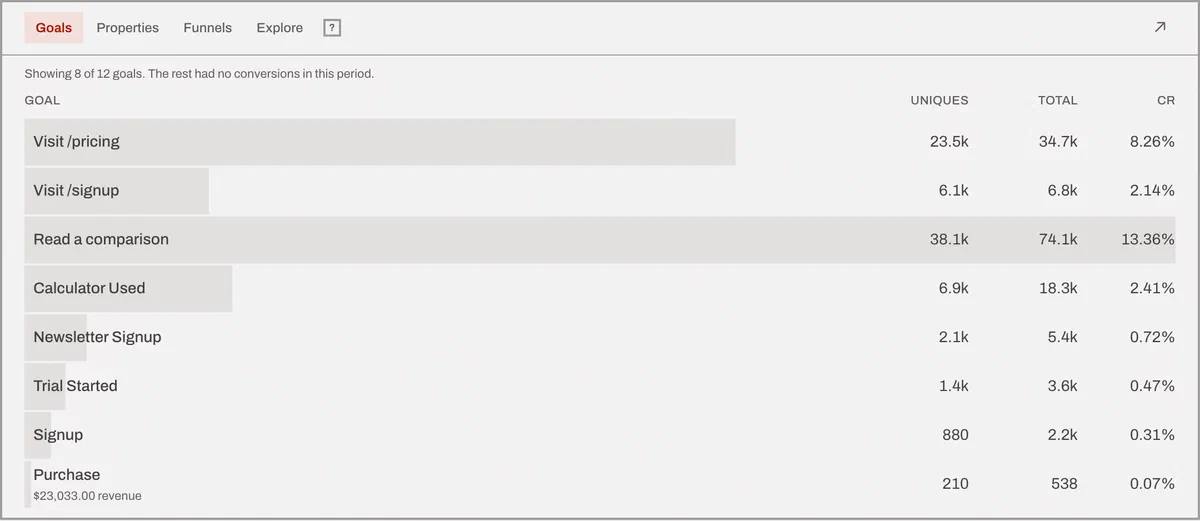
Every site gets four goals for free
Created with the site, ready to count:
404- 404 pagesOutbound Link: Click- Outbound link clicksFile Download- File downloadsForm: Submission- Form submissions
Three of those four fill themselves in. The browser script sends outbound clicks, downloads and form submissions without being asked. The goal costs nothing; the events it counts are custom events like any other, and they do count toward your monthly volume.
The 404 goal is the exception: the base script can’t see a 404, because as far as the browser is
concerned an error page is just a page. That event comes from the
WordPress plugin, which sees the response code server-side, or from your own
feasible('404') call on your error template.
The earlier Form: Submit event name is still accepted for existing integrations.
They’re created with the site rather than when the first matching event arrives, because a goal that springs into being with the traffic would start counting after the thing you were trying to measure. They stay hidden from the report until they have at least one conversion, so a site that never sends a 404 event doesn’t carry an empty row forever.
Goals start when you create them
This is the single most common surprise, so it gets its own heading.
A goal is evaluated as events arrive, not retroactively over your history. The historic events were never tested against a rule that didn’t exist. Creating a goal today gives you a number that starts at zero today.
A report over a range that begins before the goal did says so, and gives you the date it starts from, rather than quietly showing a smaller number. There’s a worked example on the metrics page.
Creating the same goal twice is a no-op that hands you back the one you already had - including its original creation date. You can’t restart a goal’s history by recreating it, and renaming one never moves it.
What a goal report shows
- Unique conversions - once per visitor, however many times it happened.
- Total conversions - every matching event.
- Converted visitors, and the conversion rate: converted visitors over all visitors in the period.
- Revenue, average revenue and revenue per visitor, when the goal carries money.
Funnels
A funnel is an ordered list of goals - at least two steps and at most eight - and it counts visitors by how far they got.
Three rules follow from how it’s walked, and all three matter:
- A funnel is scoped to one visit. Somebody who signs up on Monday and buys on Thursday is two visits and completes nothing. Measure that with a pair of goals rather than a funnel.
- Steps are always in order; detours are a choice. Allow other activity between funnel steps is
on by default and lets unrelated pages and events happen in between. Turn it off and the configured
steps have to be consecutive actions. Pick deliberately: most acquisition funnels want it on, while
a tightly controlled checkout may be worth turning off. The API field is
strict_order, andtruethere is the switch turned off. - One event advances at most one step. A wildcard goal and the exact page beneath it can’t both be satisfied by the same pageview, which is what stops a funnel completing itself on a single load.
Each step reports visitors, visits, drop-off against the step before it, and conversion rate against the first step.
A funnel’s measured window starts at the later of the funnel’s own creation and its newest goal, and it says so. Otherwise a newly configured funnel, or a newly added step, would render old traffic as a cliff that never happened.
Explore user journeys
Explore starts from any page, event or configured goal and shows what visitors did immediately before or after it in the same visit.
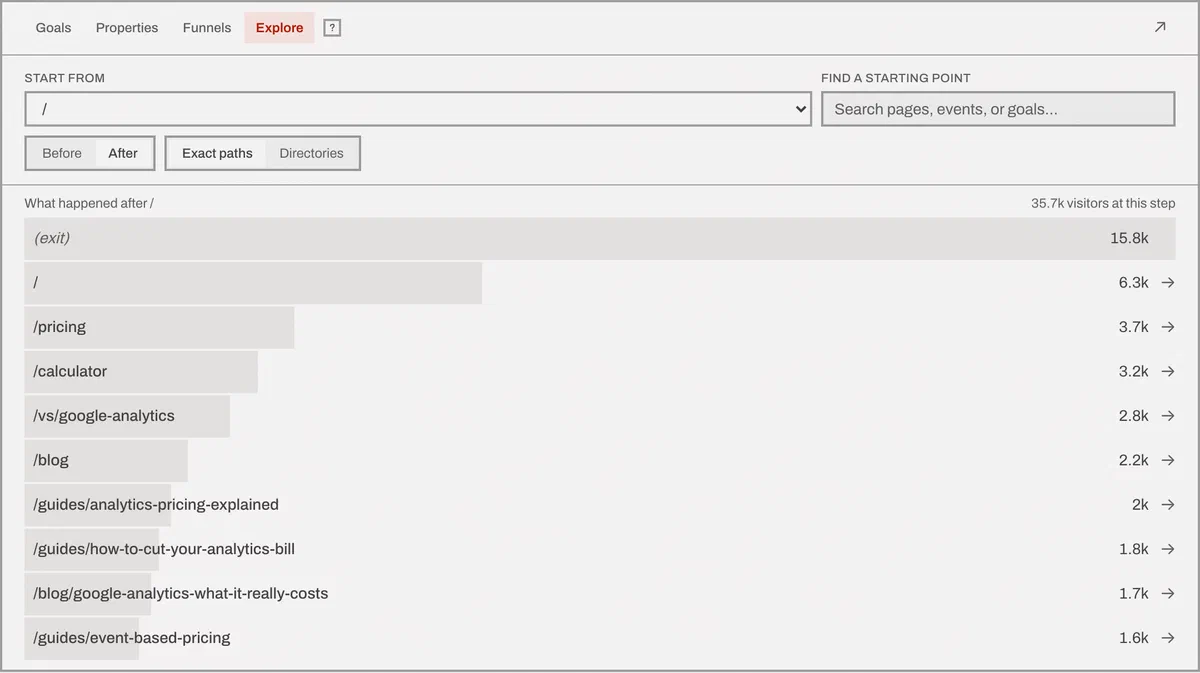
Choose a result to extend the trail one step at a time, or reverse the direction to find which paths led to a conversion. Dashboard filters apply to every step.
Pages can be grouped by their first directory to surface patterns, then switched to exact paths for
detail. Visits with no next or previous action stay visible as No further action, because drop-off
is often the most useful result in the report. Trailing slashes aren’t normalized: /about/ and
/about stay distinct in exact mode, matching Pages.
Revenue
Revenue rides on a custom event, as an amount and an ISO 4217 currency:
feasible('Purchase', { revenue: { amount: 49.00, currency: 'USD' } })
It’s stored in minor units - cents, pence - and never converted when it’s written, so a change in exchange rates can’t rewrite a past quarter. Conversion happens at read time.
Three consequences worth knowing:
- If a range holds more than one currency and you haven’t said which one to total in, the query is refused, with a message naming the currencies it found. Adding numbers in different currencies and calling it a total is worse than an error.
- Money we couldn’t convert for want of a rate is reported as a warning naming how much was left out, rather than being silently dropped from the total.
- Rounding happens once, on the total - not on every event and then again on the sum.
Stripe will never be your best marketing channel