Installation
One snippet, and how to tell whether it’s working.
One snippet, on every page you want counted. No build step, no consent gate to wire up first.
<script>window.feasible=window.feasible||function(){(window.feasible.q=window.feasible.q||[]).push(arguments)};</script>
<script defer src="https://app.feasible.lol/js/fs-k7m2q4x5r3n6t2v5.js"></script>
The second tag is the tracker: 3,569 bytes gzipped - a handful more for your copy, which has your domain baked into it - and it’s deferred, so it never blocks rendering.
The first is a 103-byte queue stub. The tracker is deferred, so your own code can run before it
exists; the stub catches those feasible() calls and the tracker replays them when it arrives.
Without it they’d throw. It does nothing if you never call feasible() yourself, and a page that
only has the second tag still counts pageviews exactly as it always did.
There are no cookies and nothing stored in the browser to identify anyone, which is why most sites won’t need a consent banner for it. Privacy and GDPR has the facts to hand your lawyer - and if you’re somewhere strict, ask them rather than us.
Copy it from the setup screen rather than typing it. The filename is different for every site and carries your domain inside the file, so there’s no attribute to get wrong.
The different filename matters more than it sounds. Blocklists name files one at a time, so a shared filename that gets listed costs everybody their traffic, while a per-site one costs one site.
The attribute form
There’s a second form that names your domain in an attribute and loads a script every site shares:
<script>window.feasible=window.feasible||function(){(window.feasible.q=window.feasible.q||[]).push(arguments)};</script>
<script defer data-domain="example.com" src="https://app.feasible.lol/js/script.js"></script>
Both forms behave identically. Use this one if you’re migrating an existing install and would
rather change one hostname than every tag, or if a tag manager is going to mangle an opaque path.
data-domain has to match the site as you registered it, and an event for a domain we don’t hold
is dropped with the reason unknown_site.
Firing events from your own code
Tagging a link or button with a class needs nothing extra - the script watches for those clicks once it loads.
Calling feasible() from your own JavaScript already works, because the queue stub is the first
line of the snippet. If you’re running an older install that’s a single tag, add the stub above it:
see calling it before the script loads.
Not an ad-blocker escape
Where to put it
Anywhere in <head> or <body>.
Which field that is depends on the platform. On a hosted site it’s a code-injection box: WordPress, Shopify, Webflow, Squarespace, Ghost, Wix and Framer. On a framework it’s a template or a head component: Next.js, Nuxt, Astro, React, Vue, Svelte, Gatsby, Hugo, Jekyll, Django and Laravel. Each guide names the exact field and the one thing that platform hides.
If your site is a single-page app, the script picks up route changes on its own - pushState,
replaceState, back and forward, and hash changes. So don’t also fire a pageview on navigation, or
every route change gets counted twice.
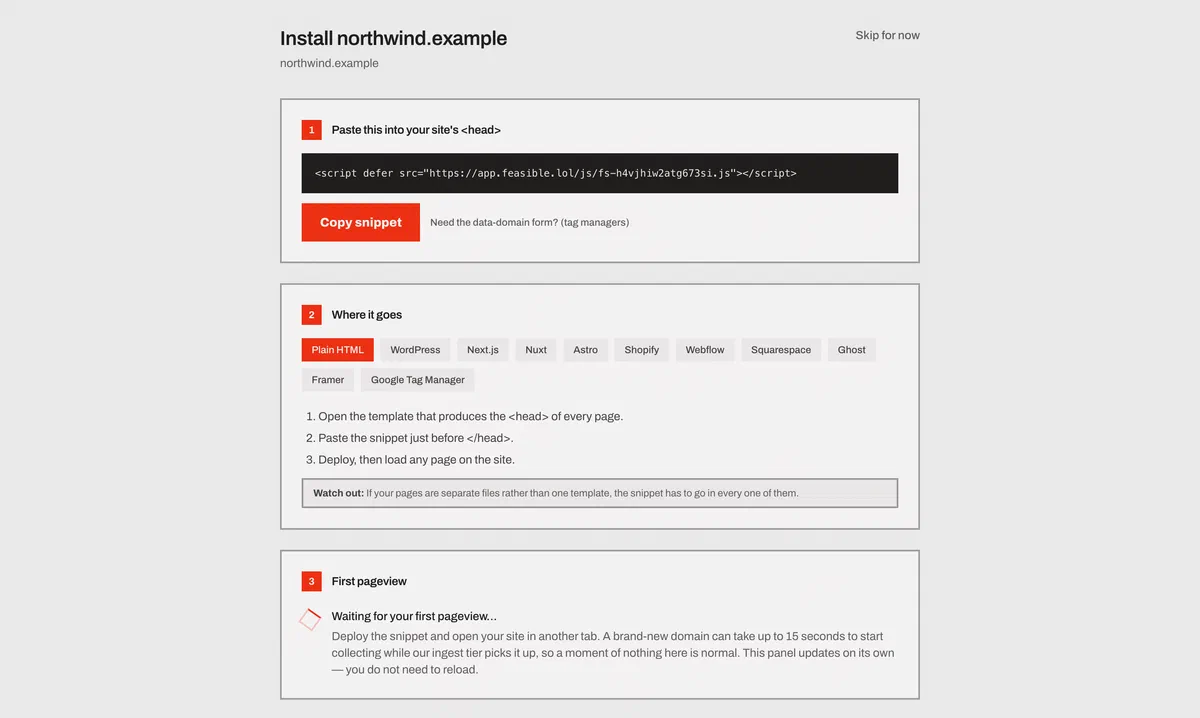
A new site takes a few seconds to start collecting
Ingestion learns which domains exist by polling, so a site you registered a moment ago can take up to about fifteen seconds before its first event is accepted.
If you paste the snippet, reload immediately and see nothing, wait a quarter of a minute before concluding anything is wrong. The setup screen waits for you and says when the first event lands.
Checking it works
The setup screen has an install check that fetches one of your pages and tells you which of the four real failures you have: the snippet isn’t there, it names a different site, it’s there but your content security policy won’t let the browser load it, or the page didn’t load at all.
To check by hand, send one event and read the response:
curl -si https://app.feasible.lol/api/event \
  -H 'Content-Type: application/json' \
  -d '{"n":"pageview","d":"example.com","u":"https://example.com/"}' \
  | grep -i x-feasible-dropped
The endpoint always answers 202. A beacon can’t act on an error code, so a rejection would only
produce a retry that fails the same way. The reason an event wasn’t counted travels in the
x-feasible-dropped response header instead, and nothing is ever dropped without one.
For the whole picture, add X-Debug-Request: true and the response is the fully derived event
instead: which address we resolved and where from, the visitor identifier, the geolocation, the
channel, and every field we’d have stored. Nothing is written, so it’s safe to run against
production. See the APIs.
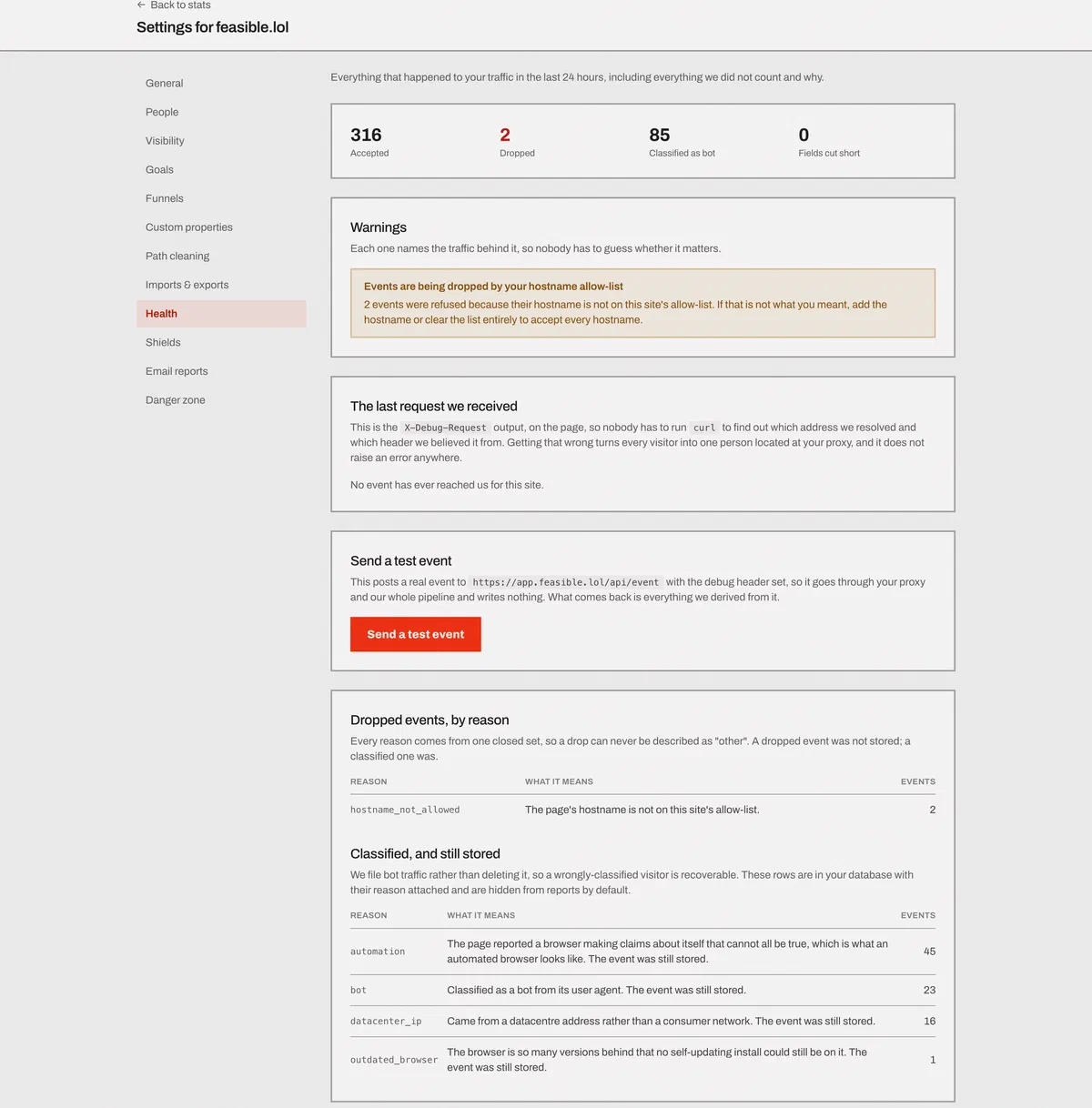
Once traffic is flowing, the ingestion health panel at
/settings/sites/<your domain>/health counts every accepted event and every dropped one, with a
named reason for each drop.
Multiple domains
Give each site its own snippet. The filename is what routes the events.
A staging copy pointed at your production domain mixes staging traffic into your real numbers, and there’s no way to unpick it afterwards. Register a separate site, or exclude the hostname.
Subdomains are a different case. app.example.com and example.com share a visitor identifier by
design, so a person moving between them is one visitor rather than two.
Visitors with JavaScript disabled
A no-script pixel goes through the identical pipeline - same derivation, same session rules, same storage:
<noscript>
  <img src="https://app.feasible.lol/api/event/pixel.gif?d=example.com" alt="" width="1" height="1">
</noscript>
It takes the page URL from the browser’s own Referer header, which is what makes it a one-liner you
can paste into a template. The consequence is that the real referrer is unknowable - a no-script
visitor is Direct unless you add &r=… yourself. It also can’t measure time on page or scroll depth,
because nothing is running to measure them.
Server-side events
Anything that happens away from a browser - a webhook, a background job, an offline conversion - can be posted straight to the events endpoint, or sent with one of the server-side SDKs.
See the APIs for the payload, including how to state the attribution for an event that has no referrer of its own.
If nothing arrives at all
- A snippet for a site you haven’t registered.
- An ad blocker. See proxying.
- A content security policy that allows our origin in
script-srcbut not inconnect-src. The script loads and then silently sends nothing, which is the hardest version of this to spot. - You’re on
localhost. That’s deliberate; see script options. - A shield of your own is excluding the traffic - your address, your country, that page, or a hostname allow-list that doesn’t include this one.