Feature
Goals, funnels and conversions
Say what counts as a win, then watch how many people get there and where the rest fall out.
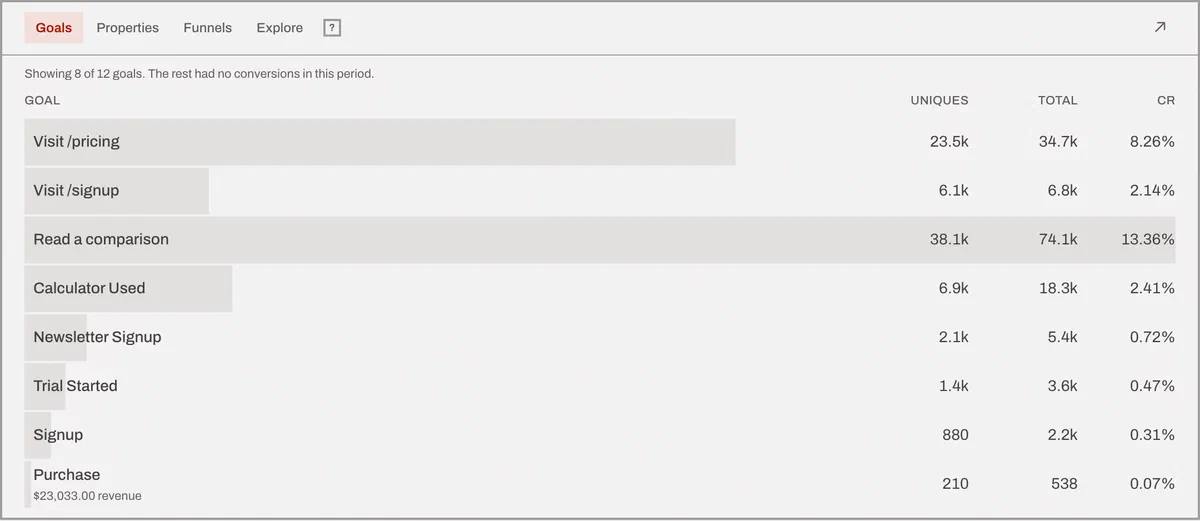
A goal is your definition of a win - a page reached, an event fired, a page scrolled far enough. A funnel is two to eight of those goals in order, with the drop-off between each step.
Both live in the Behavior card at the bottom of the dashboard, and both are configured in site settings or through the API.
Three kinds of goal
Page goals match a path, with wildcards - /thanks, or /docs/*. Up to
2,000 characters of pattern, which is more than anyone has ever needed.
Event goals match a custom event name you send from your own code:
feasible('Signup'). Up to 300 characters.
Scroll goals fire when a visit’s deepest engagement ping reaches a percentage you pick, and can be narrowed to a page pattern. That’s how you count “read the article” rather than “opened the article”.
Any goal can carry up to three property constraints, so “Signup” and “Signup where plan is scale” are two different wins.
Four goals are created with every new site, before you configure anything:
404 pages, outbound link clicks, file downloads and form submissions. The
tracking script emits three of those on its own, with no flag to set - an
outbound click is counted without ever calling preventDefault, so the link
still behaves like a link, and a middle-click counts too. The 404 goal is the
exception: it’s created for you, but the base script doesn’t detect 404s. That
one comes from the WordPress plugin.
Whether detours are allowed
A funnel is 2 to 8 steps, each step a goal you already defined. Steps always happen in order. One switch decides how much can happen between them:
Allow other activity between funnel steps. Leave it on and somebody who views the pricing page, wanders off to the blog, then signs up has still completed the funnel. This is the default and it’s what you want almost always, because real people browse.
Turn it off and the steps must be back to back, with nothing in between. Use it when the detour is the finding: a checkout where anyone who bounces to the help center has, for your purposes, failed. Our own measurements of how long a page was read don’t count as activity either way.
The report is proportional columns, one per step, each showing visitors, the conversion rate to that point, and how many dropped. The header repeats the setting in the same words as the form, so nobody reads a back-to-back funnel as though detours were allowed.
Page paths
A funnel tests a route you already suspect. The Explore tab does the opposite:
pick any page, custom event or goal, and it shows what happened immediately
before or after it across your traffic - 10 steps by default, up to 20, with
explicit (entry) and (exit) rows so a journey that started or ended there is
visible rather than absent.
Click a step and the journey continues from there, building a breadcrumb trail.
You can group by exact path or by directory, which is the difference between
seeing 400 blog posts and seeing /blog.
Goals start today
Because we’d rather have one rule that’s true than a rule that works for a third of the cases.
A page goal could be recomputed from pageviews you already stored. An event
goal can’t - if your code never sent Signup, there’s nothing to find. A scroll
goal can’t either, past the point where engagement pings have been folded into
roll-ups. Backfilling the one kind that’s cheap would mean page goals quietly
behave differently from the other two, and you’d learn that at the worst
possible moment, from a number you’d already put in a deck.
So all three behave the same way, and the report says so on its face: it prints the date the goal became measurable instead of drawing a flat line back to the beginning of time and letting you draw your own wrong conclusion.
The practical consequence: set your goals when you install. It takes two minutes, and it’s the one piece of setup that can’t be done later.
Goals that carry money get their own treatment - see revenue tracking. To split a goal by something only your app knows, see custom properties. Full reference in the goals and funnels docs.
The trade-off
Goals don’t backfill. A goal you create today starts counting today - conversions before that moment aren’t recovered, and the report tells you the date it started rather than showing a flat line and letting you assume.