MIGRATING
Moving off Google Analytics
Seven steps, about twenty minutes of work and two weeks of waiting. Including why the two tools will never show you the same number.
A Google Analytics 4 migration is seven steps here. About twenty minutes of work, and two weeks of waiting in the middle while both tools run side by side.
Before you start, the one thing worth knowing: GA4 history can come across as CSV. Universal Analytics history probably can’t. Google cut off access to current and historical Universal Analytics data from the week of July 1, 2024 (Google’s own page). If you didn’t export it then, it isn’t there to import. Nobody can get it back for you, and any vendor who says they can is wrong.
1. Create the account
Sign up. Email and a password, or Google sign-in. Thirty days free, no credit card, and the trial has every feature in it rather than a reduced set.
2. Add the site
Enter the domain - example.com, no https://, no trailing slash. Subdomains
share visitors with the registrable domain by design, so app.example.com and
example.com belong to the same site.
You’ll land on an onboarding screen that shows the snippet and waits for the first event.
3. Install the script next to Google Analytics
One snippet in your <head>. Leave the GA4 tag where it is.
<script>window.feasible=window.feasible||function(){(window.feasible.q=window.feasible.q||[]).push(arguments)};</script>
<script defer src="https://app.feasible.lol/js/fs-k7m2q4x5r3n6t2v5.js"></script>
3,569 bytes gzipped. There’s no second script file to choose between and no plugin variants - outbound link clicks, file downloads, form submissions, scroll depth, time on page and single-page-app route changes are all counted with no extra configuration.
If you use a tag manager, you can add it there, though a tag in the template is
one fewer thing between you and your data. If your site is behind a CSP, allow
app.feasible.lol in both script-src and connect-src.
Run both for a fortnight
4. Check it’s working
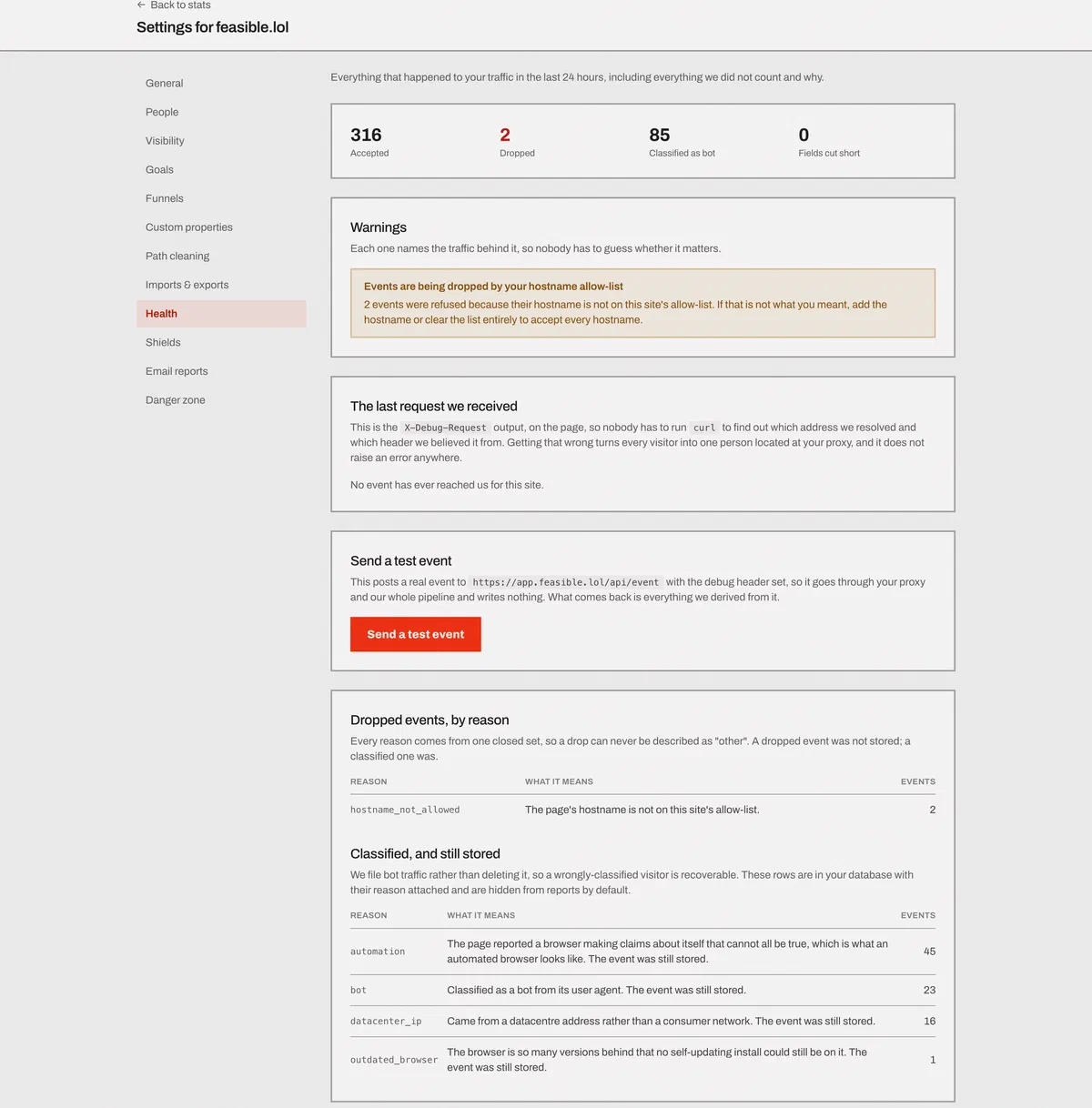
Go to the site’s health panel. It’s a 24-hour view of what arrived and what didn’t.
Every dropped event is counted with a named reason - bot, datacenter IP, referrer spam, outdated browser, automation, hostname not allowed, rate limited, and so on
- so “why is my traffic low” has an answer instead of a shrug.
The panel also shows which client address was resolved for the last request and which header it came from, and warns you if your proxy isn’t forwarding visitor addresses, which is the failure that collapses every visitor into one and geolocates your whole audience to a data center.
There’s a send a test event button. It posts to the real public endpoint over the real network, not to an internal function, so it exercises your proxy and headers as a browser would.
5. Bring your GA4 history across as CSV
In GA4, export the reports you want to keep - pages, traffic acquisition, locations, devices, browsers. Each one downloads as a CSV. In Feasible, go to site settings → imports and upload the folder, or zip the lot and upload that. The ceilings are 200 MB an upload, 5,000,000 rows a file and 100 CSVs in one archive, which is more history than most sites have.
It lands on the same charts as your live traffic, dated where it belongs, so your history sits behind the day you installed the script instead of the charts starting from zero.
A direct Google connection is on the way. Today it’s a CSV upload.
A column we don’t recognize stops the import and names the column. The alternative is dropping it quietly and handing you a number that’s wrong in a way you can’t see, and we’d rather make you fix the header.
What doesn’t come across, so nothing is a surprise later:
- GA4 goals and conversions. Recreate them here. Ours are page patterns, custom events or scroll depth, and four are created automatically with every site: 404, outbound link click, file download and form submission.
- Audiences, Explorations and saved reports. They don’t have an equivalent.
- Anything GA4 thresholded away. If Google hid a row from you, it isn’t in the CSV either.
Imported history is stored as roll-up rows that also record which dimensions the source reported. So a filter on a dimension the imported data has narrows it like live traffic, and a filter on a dimension it lacks shows up as a labeled gap rather than silently reading zero. That’s the sort of thing you only appreciate the first time a chart lies to you.
6. Set up the things that don’t import
Twenty minutes, once.
- Goals. Page pattern, custom event or scroll depth. Note that goals don’t backfill - conversions count from the moment you create the goal, so make them early.
- Funnels, if you use them. Two to eight steps, with detours between them allowed or not.
- Exclude your own traffic. Shields take an IP or CIDR, a country, a page pattern, or a hostname allow-list. Rules take effect within 15 seconds. Or set the self-exclusion flag in your own browser.
- Path cleaning, if your URLs carry IDs. A regex rule merges
/users/<uuid>into/users/:id, with a preview before you save. - Email reports and alerts. Weekly or monthly, sent at your site’s own local midnight. Alerts for traffic spikes and drops, checked every 10 minutes.
7. Remove the Google Analytics tag - and maybe the banner
Once the two weeks are up and you trust what you’re seeing, delete the GA4 tag. That’s it; nothing else needs undoing.
The consent banner is a separate question. If GA4 was the only thing on your site that needed consent, most sites can drop the banner: Feasible sets no cookies and stores no identifier, so there’s nothing to consent to. Check what else you load first - embedded video, chat widgets, ad pixels, hosted fonts and A/B testing tools all commonly need one on their own.
We’re not lawyers and this isn’t legal advice. The reasoning is on the GDPR-friendly analytics page, including the two conditions attached to the UK’s statutory analytics exemption.
Your numbers won’t match. Here’s why
They never do, between any two analytics tools, and anyone promising otherwise is selling something. Four structural reasons:
Bot filtering is different. We classify bots five ways in order - user agent against about 70 tokens, browser-side automation signals, a datacenter IP check across 11,842 merged CIDR ranges, an outdated-browser test, and referrer spam - and we count what we dropped and tell you why. GA4 filters differently and shows you far less about what it removed. Filter harder and your numbers go down. That isn’t losing traffic; it’s counting fewer robots.
Ad blockers hit each tool differently. Some blocklists carry Google’s endpoints and not ours; some carry both. Blocking rates vary enormously by audience - under 10% on a mainstream consumer site, much higher on a developer audience. Whichever way it falls, it moves one tool and not the other.
A “session” isn’t the same thing. Ours stays open for 30 minutes of inactivity and is tied to the daily visitor hash, which resets at midnight UTC. GA4’s session logic has its own rules, its own timeout, and its own campaign re-attribution behavior. Two definitions, two answers.
GA4 thresholds and can sample. Rows vanish when counts are low and demographic data is on, and “Data thresholds are system defined. You can’t adjust them” (source). Sampling is marked “Possible” for Reports, Insights and Explorations in Google’s own table; only the BigQuery export is marked “No” (source).
What to do about it. Compare the shape, not the number. If both tools show the same weekly pattern, the same top five pages and the same top sources, the migration worked. Pick one tool as the number you report and stop reconciling - reconciling two definitions of a session is a job with no end.
One more, less structural: we count differently on purpose. Unique visitors here are a daily figure, because the key that makes the visitor hash changes every UTC day. Someone who reads you Monday and Thursday is two visitors. Over a 28-day window, our “unique visitors” will run higher than a cookie-based tool’s, and that’s the design, not a bug.
If you’d rather not switch yet
Nothing stops you running both indefinitely. The scripts don’t conflict, and plenty of people keep GA4 purely for the Google Ads integration while doing their day-to-day reading somewhere calmer. Just remember that keeping GA4 means keeping its consent banner.
Two weeks of running both is the whole cost of finding out. If you’d rather read first: the comparison with Google Analytics, the wider list of alternatives, and the wider web analytics tools comparison if you haven’t settled on where you’re going yet.
Questions
- How long does the migration take?
- About twenty minutes of actual work, spread over two weeks. Installing the script is one line. The waiting is deliberate - you run both tools side by side long enough to trust the new numbers before you remove the old tag.
- Can I import my Google Analytics history?
- Yes, as CSV. Export your GA4 reports, upload the folder, and it lands on the same charts as your live traffic. Universal Analytics history is a different matter: Google cut off access to it from the week of July 1, 2024.
- What data comes across from GA4?
- Whatever you export: daily totals, pages, sources, locations, devices and browsers. What doesn’t come across: GA4’s own goals and conversions, audiences, Explorations, and anything GA4 thresholded away before you hit download.
- Why don't the numbers match Google Analytics?
- Four reasons, all structural: the two tools filter bots differently, ad blockers hit them differently, they define a session differently, and GA4 thresholds and can sample its own reports. Expect a gap in the tens of percent and compare trends, not absolute numbers.
- Can I remove my cookie banner after switching?
- If Google Analytics was the only thing on your site needing consent, most sites can. Feasible sets no cookies, so there’s nothing to consent to. Check what else your site loads first - embedded video, chat widgets, ad pixels and fonts often need one on their own. Not legal advice.
- Should I keep Google Analytics running as well?
- You can. The two scripts don’t conflict, and some people keep GA4 purely for the Google Ads integration while doing their day-to-day reading elsewhere. If you keep GA4, you keep its consent banner.